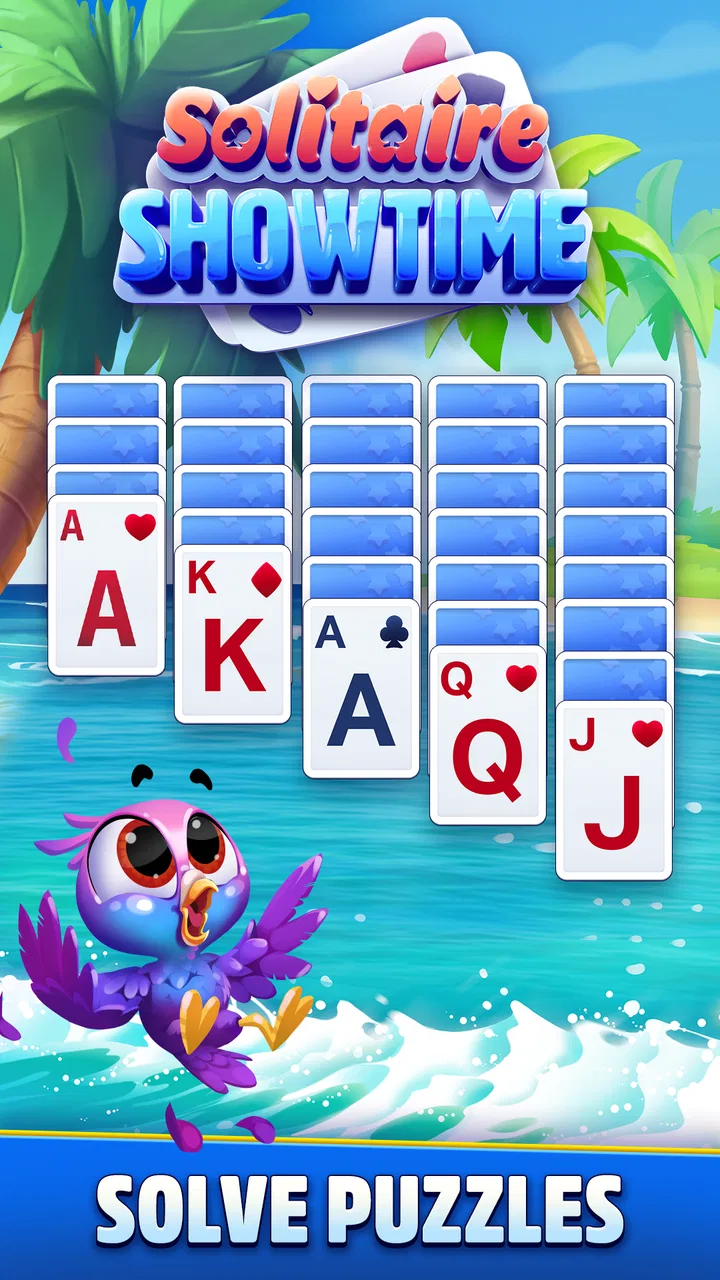
Solitaire Showtime
- 4.8
- Rating
- 1.00M
- Installs
- Free
- Price

 Analysis by App-foxy
I approached Solitaire Showtime as a casual card game for the moments when I want something familiar but less plain than a traditional solitaire table. Its basic idea is easy to understand: it keeps the recognizable card-game foundation, then wraps it in a more playful, show-themed presentation. That makes it approachable for a quick break, while still giving the experience more personality than a bare-bones solitaire app.
It is a free game from Jam City, Inc., rated for Everyone, and it belongs firmly in the casual card category. The store summary promises solitaire with a twist, and that is the right way to frame it: this is not aimed at replacing a serious collection of card games. It is designed to make a familiar pastime feel more colorful and entertaining. After spending time with it, I see the appeal, although I also think its presentation will matter more to some players than to others.
How Solitaire Showtime feels in everyday play
The first strength is accessibility. Solitaire is one of those games that does not require a tutorial-heavy commitment. I can open it, understand the objective quickly, and decide within moments whether I want to play one round or stay longer. That makes it a natural choice for a commute, a waiting room, or a quiet pause between tasks.
You May Also Like

 Blood Strike: 2.5 Anniversary
Blood Strike’s Loadouts Turn Every Drop Into a Tactical Gamble
A close look at Blood Strike’s custom loadouts: how fast access to signature weapons reshapes its battle royale rhythm, rewards preparation, and narrows the gap between fights.

 Pandora - Music & Podcasts
Pandora’s Music Is Easy to Start, but Harder to Recover
Pandora’s strength is its low-effort path from a seed to a station. Its weak spot is how much confidence it asks you to place in connection, setup, and quiet recovery.

 8 Ball Pool
 Is Built on Rivalries, Rematches, and Routine
A close look at the rivalries, rematches, shared routines, and unanswered safety questions that turn a quick pool match into a persistent mobile community.

 Samsung Music
’s Quiet Strength Is Playing What You Already Own
Its reach comes less from spectacle than from dependable access to a personal library. That simplicity is both the app’s strongest retention engine and its ceiling.

 AccuWeather: Weather Radar
AccuWeather Review: A Quick, Clear Forecast for Everyday Decisions
For everyday plans, the best forecast is the one you can understand quickly. AccuWeather makes rain timing, radar, and local conditions easy to act on, with a few trade-offs.

 Hill Climb Racing
Why Hill Climb Racing Still Turns Crashes Into One More Run
A tiny car, a bumpy hill and one more upgrade: Hill Climb Racing keeps resurfacing because its simple chaos makes every near-miss feel personal.
More From Our News Desk



The show-style identity gives the game a different mood from the usual digital solitaire alternatives. A minimalist app may be better for someone who wants only cards, a timer, and nothing else. Here, the surrounding presentation is part of the attraction. I would recommend it to players who enjoy a little atmosphere around a familiar card format, especially if a plain green-table design feels too repetitive.
At the same time, the familiar rules are still important. The game does not need to reinvent solitaire to be enjoyable, but the added personality has to support the card play rather than distract from it. My experience is that the best sessions are the short ones where the visual style adds energy without making the basic decisions feel buried under decoration.
What the free download means in practice
The game is free to download, which makes it easy to try without making a commitment. It includes in-app purchases ranging from $0.99 to $99.99 per item, so I would approach it with the same awareness I use for any free-to-play casual game. The download itself is accessible, but optional spending can become part of the experience for players who want to move through the game more quickly or engage more deeply with its available extras.
That distinction matters because solitaire players often have different expectations. Some want an entirely quiet pastime with no pressure to spend. Others are comfortable with a free game that offers additional purchases as long as the basic play remains enjoyable. I would put Solitaire Showtime closer to the second group. Before installing it for a child, I would also review purchase controls on the device, even though the content rating is Everyone.
For me, the sensible way to use it is to treat purchases as optional rather than necessary. I would first play enough to decide whether the core loop feels satisfying. If the game already works as a short daily diversion, there is no reason to spend simply because an offer appears. That approach keeps the app in its proper place: a casual entertainment option, not a commitment.
Speed expectations on everyday devices
Solitaire is naturally lighter than a modern action game because its central activity is a card layout rather than a large interactive world. That gives me a reasonable expectation of a quick, uncomplicated start on a compatible phone or tablet. The current version is 27.4.0, and the listed minimum requirement is Android 6.0, which places it within reach of many older Android devices.
Still, a low-intensity card game is not automatically effortless on every device. Older hardware can take longer to open visually polished games, and a phone with little free storage or many background tasks may feel less responsive than a clean, recently restarted device. I would not judge the game solely by how quickly it opens on an aging handset. The more useful test is whether the cards respond consistently once a round is underway.
In normal use, the game should appeal to people who dislike waiting through a long setup before a quick session. Its format suits instant play: open it, make a few moves, and leave when the break is over. That is one reason it is more practical than a larger game when I want entertainment without planning a dedicated gaming session.
There is also a trade-off between presentation and efficiency. A plain solitaire utility can feel almost immediate because it does very little beyond displaying cards. Solitaire Showtime has a more expressive identity, so players who prioritize the absolute leanest experience may prefer a simpler alternative. I would choose this one when atmosphere matters, not when every fraction of a second matters.
What happens during longer or heavier sessions
The most demanding moments are likely to come from extended use rather than from the card decisions themselves. A short round is a modest task for a compatible device, but repeated play can expose ordinary limitations: battery drain, heat from a busy phone, or slower responses when other apps are active. I would pay attention to those signs if I planned to use it for a long evening rather than a few minutes.
My practical tip is to close unnecessary background activity before a long session on an older phone. That is not a special requirement of this game; it is simply a useful way to give any casual title a cleaner environment. If the device is already handling navigation, music, messaging, and several open apps, I would expect less consistent performance than when Solitaire Showtime is the main task.
Another useful habit is to avoid judging the game during the most crowded moment on the device. If the phone has just installed updates, is low on storage, or is performing other maintenance, an opening delay may say more about the device than the card game. I would try it again after freeing space or restarting before deciding that the app is inherently slow.
For heavy users, the more important question is not whether the game can run for a long time, but whether the repeated loop stays pleasant. Solitaire can become repetitive even when it performs perfectly. The show-themed layer helps give it a stronger identity, but it cannot remove the basic repetition built into the genre. Players who need constant novelty may tire of it sooner than people who enjoy familiar patterns.
Reliability, interruptions, and recovering a session
Reliability matters more in solitaire than many people expect. A round is often a quiet, focused activity, so an interruption feels especially irritating if I lose the position I was working through. I therefore look for a game that behaves predictably when I switch away briefly, answer a message, or return after the phone has been idle.
I would still use a cautious routine: finish a move before leaving the app, avoid force-closing it in the middle of a round, and reopen it calmly if the operating system has suspended it. That workflow reduces the chance of confusing an interrupted session with a failed one. It is particularly useful on older hardware, where background apps may be removed more aggressively to preserve memory.
The app’s broad availability helps its practical appeal. With more than 1 million installs and an average rating of 4.8 from roughly 167,000 ratings, it has clearly attracted a substantial audience. Those figures do not guarantee that every device will behave identically, but they do make it easier for me to view the game as an established casual option rather than an obscure experiment.
There are around 11,000 written reviews associated with it, which also suggests that players have spent enough time with the game to form opinions beyond a first glance. I would still read recent comments before installing on a particularly old device, because compatibility and responsiveness can vary with operating-system conditions. The listed minimum of Android 6.0 is helpful, but meeting a minimum does not always mean receiving the smoothest experience.
If the game ever behaves oddly, my first recovery steps would be simple: close other apps, restart the device, check available storage, and make sure the installed version is current. I would not immediately clear app data, because that can affect local progress or settings in some games. A careful restart is a safer first move than deleting anything important.
Device constraints and choosing the right alternative
The Android requirement makes this a reasonable candidate for people using older phones, but I would separate compatibility from comfort. A device may technically support Android 6.0 while still having limited memory, an aging battery, or a screen that makes detailed card presentation less comfortable. For a quick game, those details are easy to overlook during installation and obvious after several sessions.
Screen size also changes the experience. On a larger phone or tablet, cards and surrounding visual elements have more room to breathe. On a small display, I would expect to concentrate more carefully on card positions and controls. If you have reduced vision or prefer very large, high-contrast interfaces, a dedicated minimalist solitaire app may be a better fit than a presentation-focused game.
Storage is another sensible consideration. I would leave some free space before installing any game, especially on an older device that already struggles when storage is nearly full. Even when the game itself is not demanding, a crowded phone can make launches, updates, and general navigation feel slower.
Compared with classic solitaire apps, this game is the more suitable choice when you want a recognizable card activity with extra character. Compared with broad card-game collections, it is more focused and easier to approach when solitaire is the only format you actually want. Compared with completely offline-looking utilities, it may feel less pure because its entertainment value depends on the surrounding presentation rather than just the rules.
I would skip it if my ideal solitaire experience is silent, stripped down, and free from any temptation to explore optional purchases. I would also look elsewhere if I need a deep competitive system, complex strategy variety, or a game built around fast reactions. Its appeal is narrower and more honest than that: it is a relaxed card diversion with a playful identity.
Three practical ways I would use it
My first use case would be a short reset during a busy day. Instead of opening a social feed and getting pulled into unrelated content, I could play a quick solitaire round, stop after a natural point, and return to work. The familiar rules make that possible without a learning curve, while the themed presentation keeps it from feeling like a spreadsheet exercise.
My second use case would be low-pressure evening play. I would lower the device volume if the phone is in a shared room, keep the session short, and avoid treating progress as a reason to spend. This works best for someone who wants a gentle activity rather than a demanding game that requires constant attention.
My third use case would be testing an older spare device. Because the minimum operating-system requirement reaches Android 6.0, I would install it after checking storage and closing background apps. I would then play several short rounds rather than relying on the first launch. That gives a better impression of whether the phone remains responsive after repeated use.
A less obvious trade-off is that the same visual personality that makes the game inviting can make it less suitable for concentration. If I am trying to play solitaire as a calming, almost meditative routine, extra presentation may be welcome one day and distracting the next. In that situation, I would keep a simpler alternative available rather than expecting one app to serve both moods perfectly.
My performance verdict
Solitaire Showtime works best as a lightweight-feeling casual card game for people who want more flavor than a traditional solitaire utility provides. Its Android 6.0 minimum makes it approachable for a wide range of devices, while its established audience and strong average rating make it a credible first option for someone browsing this category.
I would describe its performance expectations as sensible rather than guaranteed: a compatible, reasonably maintained device should be a comfortable place to try it, but older hardware, limited storage, and heavy background activity can still affect the experience. The game is not the right choice for someone who wants the smallest possible app or a completely distraction-free card table.
The free entry point is a genuine advantage, provided I remember that optional purchases sit between $0.99 and $99.99 per item. I would play first, decide whether the core experience earns regular use, and keep spending controls in mind. That approach lets the game remain a simple break-time activity instead of turning a familiar card pastime into an unnecessary expense.
Overall, I would recommend it to casual solitaire fans who enjoy presentation, quick sessions, and a little extra personality around the cards. I would point minimalist players toward a plainer alternative, and I would not install it on an older phone without checking storage and testing several rounds. For the right audience, the best reason to choose Solitaire Showtime is its balance between familiar play and a more entertaining wrapper.
FAQs for Solitaire Showtime
01What is Solitaire Showtime?
Solitaire Showtime is a mobile card game built around the classic Klondike Solitaire experience, presented with a more colorful, modern style. After installing it, players can complete familiar one-card and three-card layouts, progress through stages, and enjoy a more game-like structure than a basic offline solitaire app. It is designed for short sessions, making it suitable for playing casually whenever you have a few minutes available.
02How do you play Solitaire Showtime?
The main gameplay follows standard Solitaire rules: arrange cards in descending order while alternating colors, build each suit from Ace through King, and use the stock and tableau to clear the board. Depending on the level or event, the game may introduce different objectives, rewards, or challenges. New players should find the controls fairly approachable, although later deals can require careful planning rather than simply moving every available card.
03Is Solitaire Showtime free to download and play?
Solitaire Showtime can generally be downloaded at no initial cost, allowing users to try the core game without purchasing it first. However, free mobile games commonly include advertising, optional in-app purchases, or both. These may relate to extra hints, additional chances, cosmetic content, or faster progress. Before downloading, it is worth checking the current store listing and reviewing the purchase settings, especially if children may use the device.
04Can Solitaire Showtime be played offline?
Some solitaire rounds may remain playable without a continuous internet connection, which is useful during travel or in places with limited coverage. Nevertheless, online access may still be required for advertisements, cloud features, updates, events, leaderboards, or restoring certain progress. Offline behavior can also vary between Android and iOS versions. If reliable offline play is important to you, test the game after installation rather than assuming every feature will work without a connection.
05Is Solitaire Showtime suitable for beginners and casual players?
Yes, Solitaire Showtime is generally approachable for beginners because it uses rules that many players already recognize from classic Klondike Solitaire. The visual presentation and guided progression can make the first games easy to follow, while later levels may provide more demanding layouts for experienced users. It is best suited to people who enjoy relaxed card puzzles, short sessions, and gradual progression, rather than players looking for fast action or complex multiplayer competition.
Pros
- Simple rules make it easy for beginners to start playing.
- Short rounds are convenient for quick breaks or casual sessions.
- Bright visuals and themed cards give the game a cheerful style.
- Multiple challenges can add variety beyond standard solitaire games.
- Offline play may be useful when an internet connection is unavailable.
Cons
- Frequent ads can interrupt gameplay
- especially between rounds.
- Some rewards or features may depend on watching promotional videos.
- Progression can feel repetitive after playing many similar levels.
- Limited customization may disappoint players wanting more card designs.
- In-app purchases may be needed to remove ads or speed up progress.

Solitaire Showtime
Gallery